2.2 Structure and technical operation of the PAR system
Index
This section contains technical information about the operation of the PAR system and is intended for interested parties and ICT support personnel
Functions of the PAR system's Excel database
Par is a completely file-based system and all database processing and calculation takes place on each user's own computer. All database operations are opened in their own Excel session, so if PAR unexpectedly stops working, it will leave this session open and it may have to be closed from the computer's task manager.
Database read and write operations
The Par database v6.0.xlsb file is always opened in reading mode if no storage need has been detected. When the necessary information has been read/saved, the aim is always to close the database file immediately so that other users can save.
Multipurpose
Multitasking in Excel is always a challenge, because Excel itself does not support proper multitasking. In the PAR system, an attempt has been made to solve this problem by detecting database file locking caused by another user's database operations. In this case, PAR waits for a while and retries the operation a few times until it reports that the database is locked. If this happens a lot in your organization, contact the PAR team.
Backup
Once for any database operation in each PAR session, it is checked whether a backup has been made for the current day. If this has not been done, a rotation of the backup files is performed, where the oldest is deleted and a new backup is copied from the current database for that day. The backup file is a 1:1 copy of that day's database.
Opening reports
When opening various PAR reports (printouts), there is a notification about calculating the formulas, after which the report opens in a new Excel window. In some cases, the report opens under the PAR program, so it can be difficult to find it. In this case, the report can be displayed by clicking on the blinking Excel icon in the task bar.
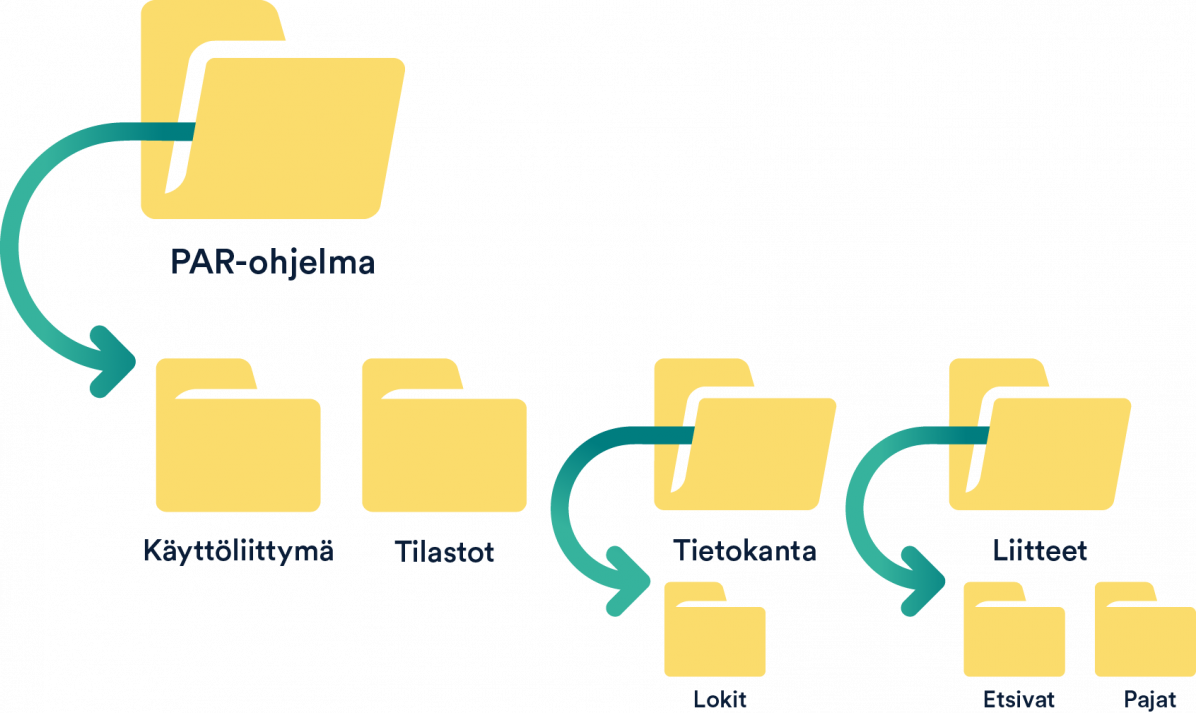
PAR system folder structure
PAR system folders can have any name (except subfolders of attachments folders), but to facilitate remote support, we recommend the following folder structure:
The PAR program root folder has four subfolders
- The user interface folder contains the Customer Template and PAR login files.
- The Parkki statistical templates are stored in the Statistics folders.
- The database folder contains the database and database backups as well as a version .txt file that tells the PAR system which version the database requires.
- The Logs folder is located under the Database folder and currently contains the Client.log and User.log files.
- In the Attachments folder, the customer's attachment files will be unencrypted, divided into folders on the user side
- Workshops (the name must be exactly "Workshops")
- Seeking (the name must be exactly "Seeking")